Are you looking for some lightweight but powerful applications for your Windows PC? But why? While many modern applications take up a lot of space and system resources, several small yet incredibly useful apps can make your computer run smoothly with minimal RAM and system resources and help you get tasks done faster. The best part of these useful lightweight applications is that they are all completely free to download and use. You can easily download these apps for Windows 11 and Windows 10 PC, and most of these support Windows 7 PC too.
Every computer needs different software to perform specific tasks. But large programs often come with many extra tools that most users never even use in their lifetime. These heavy apps require more storage, more memory, and more processing power. However, in the case of these small apps, they are designed to perform almost the same task efficiently without consuming excessive system resources. Also, they’re simple, fast, and easy to use without putting any extra load on your PC.
Although these small apps have several advantages, it does not mean that large applications are not valuable. Actually, a large application includes many other tools and advanced features along with the one required by the user. But most of us are unaware of those features, or sometimes we do not require those extra features. A small application focuses mostly on the main feature that the user needs. Also, the small apps are simple and easy to use by the users.
The 13 Useful Lightweight Applications for Windows PC:
There are several advantages of using small applications on your PC. A small application not only takes less disk space but also takes less system resources and memory. It does not slow down your computer system while running, even if you run several apps together.
[Related: 11 Must-Have Software for Windows]
[Related: 7 Best Truly Free PDF Readers for PC]
In this article, we will discuss some of the most useful small apps for Windows PCs. These applications offer very essential functionality and extend the workability of your computer without consuming money and system resources. Most of these apps are free for personal use. There are several such applications available, and to help you sort out, we have prepared a list of the 13 most useful lightweight applications for Windows PCs that can be used to work in a faster and safer way.
Sumatra PDF: Smallest PDF Reader:
The Portable Document Format, widely known as PDF, is one of the most popular file formats. It is a widely used file format that is supported by different devices and platforms. The software used to read or view a PDF file is called a PDF Reader or a PDF Viewer. There are several free and paid PDF reader apps available for Windows. The Sumatra PDF is a popular PDF reader software for Windows that is capable of opening, rotating, zooming, searching PDF files, and printing PDF files.
Sumatra PDF is considered the smallest and most powerful free PDF reader for Windows computers. The size of the app is only 5 MB and it requires very little system resources and memory. Besides a PDF reader, The Sumatra PDF is a very simple but powerful reader that is also capable of reading eBook formats like ePub, Mobi, XPS, DjVu, CHM, and Comic Book (CBZ and CBR) on Windows PC. If you are searching for a small and lightweight PDF reader to read or view PDF files, you can try the Sumatra PDF application. You can learn more about Sumatra PDF by visiting the link below.
Learn about Sumatra PDF Reader
Cool PDF Reader: Smallest PDF Reader and converter:
Just like Sumatra PDF, the Cool PDF Reader is another lightweight PDF viewing software for Windows PC. Along with all the primary features required to handle a PDF file, Cool PDF also includes a conversion feature that lets you convert PDF files to images and text files. It is a very useful advantage of Cool PDF Reader over Sumatra PDF. It is published by CoolPDF Software.
Learn more about Cool PDF Reader
Related Article:
Image to PDF or XPS: Free Converter
Image to PDF or XPS is one of the tiniest but very useful free software for Windows. It is used to convert any image file to PDF or XPS format instantly. If your current PDF viewer is unable to convert your images to PDF, the “Image to PDF or XPS” can do it very easily. It is a very simple program that can convert single and multiple images to PDF instantly. This freeware application is developed by Jesse Yeager for the Windows Operating System.
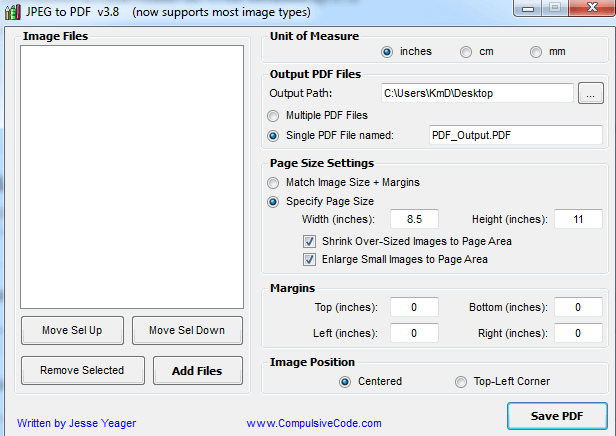
The input image formats supported by this program are BMP, GIF, PNG, TIF, WMF, EMF, XPS, and CBZ, in addition to JPG, JP2, J2K. This program was formerly known as JPEGtoPDF. This useful small application also supports image scaling and positioning.
You Can Get the Image to PDF or XPS here
Paint.Net: Free Photo Editor:
Most of the professional photo editing software we use is quite large in size. The most popular premium image editor, Adobe Photoshop, has a setup file that is more than 1 GB in size, and the best open-source free photo editing software GIMP, is almost 200 MB. But the Paint.NET is much smaller than other photo editing software.
Paint.NET is a free photo editing software for Windows. Although it is a very small app (60 MB setup file), it is considered one of the best lightweight free applications to edit photos. In spite of its limited functionality, it can be used to edit and manipulate photos easily.
Paint.Net has some advanced photo editing features like clone stamp, pencil, text maker, paintbrush tool, layers, effects, etc. Paint.Net is not a substitute for any professional photo editing tools, but you can use it as a basic photo editing app. This useful, lightweight application is developed by dotPDN LLC. You can download the latest version of Paint.NET from its official source using the below download link.
7-Zip: Best Free File Archiver:

The File Compression Software or File Archiver is one of the most important and must-have utility apps for Windows PC, used to create a compressed zip (archive) file or to decompress a zip file. 7-Zip is a free but one of the most useful small applications for Windows.
It is an open-source application developed by Igor Pavlov. You can use the 7-Zip file archiver on any computer, including a computer in a commercial organization, without registering or paying for 7-Zip. The 7 zip can create highly compressed archive files. It can even compress a 1GB document to just 20 MB or less using proper settings. You can see the video tutorials about how to compress 1GB files to 20 MB here.
7-Zip can run on all Windows versions, like Windows 11, 10, 8, 7, Vista, and even the old Windows XP, including Windows servers.
Convert: Free unit converter for Windows
A unit converter app is very useful when we try to convert any unit of measure to another. The “Convert” is free and a very small application that is able to convert almost all kinds of units of measurement instantly. This is a very lightweight and free unit converter for Windows developed by Joshua F. Madison.
The Convert unit converter supports different types of units of measure, such as Energy, Force, Flow, Mass, Power, Flow, Pressure, Speed, Temperature, Time, Torque, Volume, Volume-dry, Amount of Substance, Acceleration, Angle, Area, Computer, Concentration, Custom, Density, and Distance. It is also able to create custom conversions.
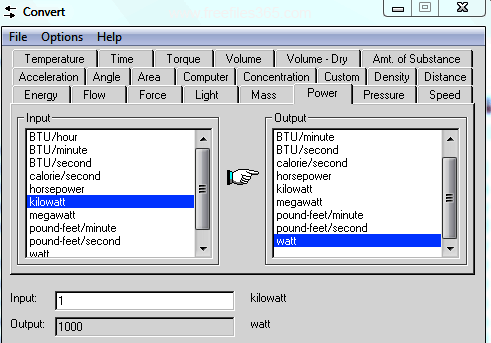
The Convert unit converter supports all Windows versions, including Windows 95 to Windows 10 (32-bit & 64-bit). You can download this free unit converter software using the link listed below. This app is 100% free for both personal and commercial use and is one of the most useful small applications.
USB Disk Security: Protect Your PC
The USB Disk Security, also known as USB Guard, is free but an essential program for your Windows PC. It protects your PC from being infected by an already virus-infected USB drive or pen drive. The USB drive, memory card, or most other removable drives are one of the main sources of transmitting computer viruses from one computer to another. Whenever you connect an infected USB drive to a computer, the virus contained by the USB drive transmits and spreads automatically to the computer and destroys everything it can.
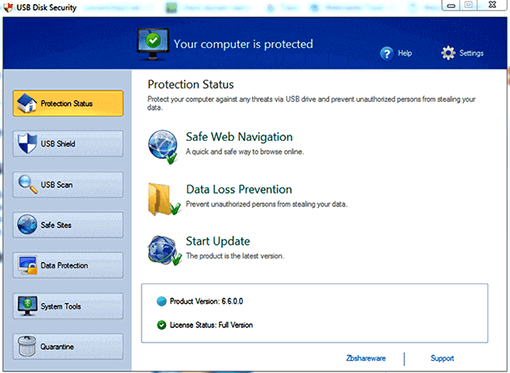
The USB Disk Security is a small but effective program that helps prevent the transmission of such dangerous viruses through any removable media to the computer system. This program can detect and eliminate any dangerous programs hidden within a USB drive when you connect the drive to a PC. USB Disk Security is freeware and a very useful small application developed by Zbshareware Lab.
Know more about USB Disk Security
HandBrake: Best Free Video Converter:
HandBrake is a lightweight, free, open-source video converter for Windows developed by The HandBrake Team. It is a simple, easy, and fast video converter app that can convert most common multimedia file formats and is also able to process copyright-free DVD or BluRay sources.

One of the main features of HandBrake is, it can compress and convert video files without losing quality. It supports all the latest Windows Operating Systems. To read more about this app and download it for Windows 11, 10, and Windows 7 (32 and 64-bit) platforms, click the link below to learn more and get this app for free.
Audacity: Free Audio Editing Software:
Audio editing software is another essential piece of software for our computer. It helps you edit your favorite audio clip as you require. There are several free audio editing software available for Windows, but Audacity offers several useful tools and features, filters, presets, and effects, such as slowed, reverb, bass and treble, amplify, echo, fade in and out, repair, repeat, reverse, and many more, to edit all the most popular audio formats like professional audio editing software.

Additionally, it supports many external plugins to extend its capabilities. It is an open-source, free application that supports all modern Windows systems.
WavePad:
Like Audacity, the WavePad is a tiny audio editor with basic audio editing capabilities. The WavePad is one of the smallest audio editors available for PC The size of the WavePad is only 2.3 MB. Although WavePad is a paid software, you can use it as a free audio editor for non-commercial use only.
WavePad provides a set of powerful tools and features required to create your own custom soundtrack. It has several audio editing features like cut, copy, paste, delete, insert, silence, auto-trim, compression, pitch-shifting, and more. Also, WavePad includes different audio effects like amplify, normalize, equalizer, envelope, reverb, echo, reverse, and several others. WavePad supports Windows 7, 8, 10, and Windows 11 computers. Download WavePad’s latest version using the link below. If you need a more powerful and truly free audio editor, then use Audacity.
Media Player Classic – Home Cinema (MPC-HC):
If you need a really lightweight media player to play almost any type of media files without impacting the performance of your PC, Media Player Classic is here for you. This is the community-maintained forked version of the original MPC-HC, which was discontinued in 2017. Media Player Classic can play a wide range of video formats with minimal system resources.

It comes with several customizable features, built-in codecs to play audio and video playback. It also supports high-definition audio streams with DTS and AC3 encoding, as well as Enhanced Video Renderer (EVR). MPC-HC has an easy-to-use, beginner-friendly interface.
MPV (Lightweight Media Player):
There are several media players available for Windows, but MPV is a powerful free media player with a lightweight and minimal design and interface. It is an open-source media player that supports a wide variety of media file formats, audio and video codecs, and subtitle formats. It also has many useful video handling features. If you want a powerful, lightweight, and customizable media player, then you can choose the MPV player over MPC-HC, as it is more powerful and highly configurable via a text-based configuration file.
Learn more about MPV Player here.
CPU Z: View All PC System Information
Sometimes we need to know different information like driver version, CPU name, rate of speed, motherboard versions, etc of our computer system. If you want to install any driver software on your PC, then you must know the exact version of the hardware. Otherwise, the driver software will not work properly. But knowing every bit of system information of a PC is not possible for a general computer user unless you are a hardware and software specialist. But, CPU Z made it very easy to see all the system info of a PC instantly.
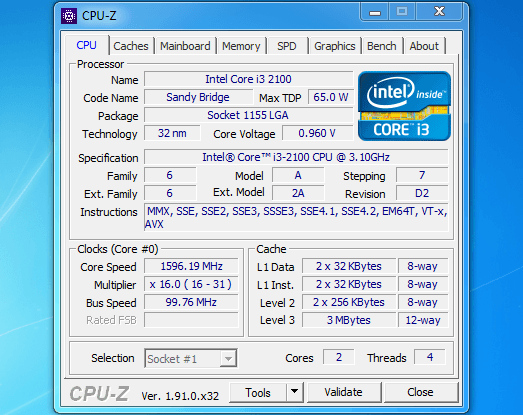
The CPU Z is a free PC system monitoring application for a Windows computer that detects and gathers all the hardware information of your PC. It can show all the data about your computer CPU, like name, maker, version, core speed, etc, data about the hardware driver, System Memory, Mother Board, Graphics, Cache, and many more. The CPU-Z can certainly be considered as a useful small application for PC. CPU Z is a lightweight, simple, and easy-to-use free system monitoring app for Windows, developed by CPUID.
Conclusion:
These are some of the most useful lightweight applications for your PC. Despite being small and lightweight, these apps can be a great help for performing several tasks on your computer at a time without slowing it down. Also, another advantage of these apps is that they can be run on a very low-end computer without any hassle. Therefore, download the required applications today for your PC and use them effectively, freely, and work with peace of mind